 Slide 1
Chapter
9
Strings
|
 Slide 2
Learning Objectives
An Array Type for Strings
C-Strings
Character Manipulation Tools
Character I/O
get, put member functions
putback, peek, ignore
Standard Class string
String processing
|
 Slide 3
Introduction
Two string types:
C-strings
Array with base type char
End of string marked with null, ‘\0’
‘Older’
method inherited from C
String class
Uses templates
|
 Slide 4
C-Strings
Array with base type char
One character per indexed variable
One extra character: ‘\0’
Called ‘null character’
End marker
We’ve used c-strings
Literal “Hello”
stored as c-string
|
 Slide 5
C-String Variable
Array of characters:
char s[10];
Declares a c-string variable to hold up to 9
characters
+ one null character
Typically ‘partially-filled’
array
Declare large enough to hold max-size string
Indicate end with null
Only difference from standard array:
Must contain null character
|
  Slide 6
C-String Storage
A standard array:
char s[10];
If s contains string “Hi Mom”, stored as:
Display page 352
|
 Slide 7
C-String Initialization
Can initialize c-string:
char myMessage[20] = “Hi there.”;
Needn’t fill entire array
Initialization places ‘\0’
at end
Can omit array-size:
char shortString[] = “abc”;
Automatically makes size one more than
length of quoted string
NOT same as:
char shortString[] = {‘a’, ‘b’, ‘c’};
|
 Slide 8
C-String Indexes
A c-string IS an array
Can access indexed variables of:
char ourString[5] = “Hi”;
ourString[0] is ‘H’
ourString[1] is ‘i’
ourString[2] is ‘\0’
ourString[3] is unknown
ourString[4] is unknown
|
 Slide 9
C-String Index Manipulation
Can manipulate indexed variables
char happyString[7] = “DoBeDo”;
happyString[6] = ‘Z’;
Be careful!
Here, ‘\0’
(null) was overwritten by a ‘Z’!
If null overwritten, c-string no longer ‘acts’
like c-string!
Unpredictable results!
|
 Slide 10
Library
Declaring c-strings
Requires no C++ library
Built into standard C++
Manipulations
Require library <cstring>
Typically included when using c-strings
Normally want to do ‘fun’
things with them
|
 Slide 11
= and == with C-strings
C-strings not like other variables
Cannot assign or compare:
char aString[10];
aString = “Hello”;
// ILLEGAL!
Can ONLY use ‘=‘
at declaration of c-string!
Must use library function for assignment:
strcpy(aString, “Hello”);
Built-in function (in <cstring>)
Sets value of aString equal to “Hello”
NO checks for size!
Up to programmer, just like other arrays!
|
 Slide 12
Comparing C-strings
Also cannot use operator ==
char aString[10] = “Hello”;
char anotherString[10] = “Goodbye”;
aString == anotherString; // NOT allowed!
Must use library function again:
if (strcmp(aString, anotherString))
cout
<< “Strings NOT same.”;
else
cout
<< “Strings are same.”;
|
  Slide 13
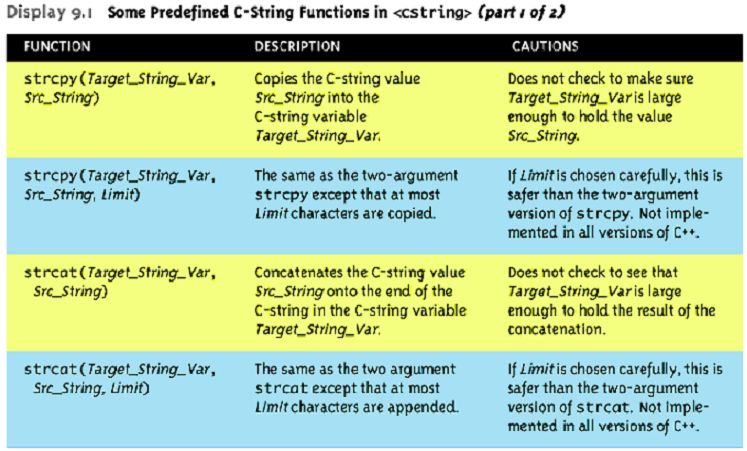
The <cstring> Library
Full of string manipulation functions
Display 9.1, page 357
|
  Slide 14
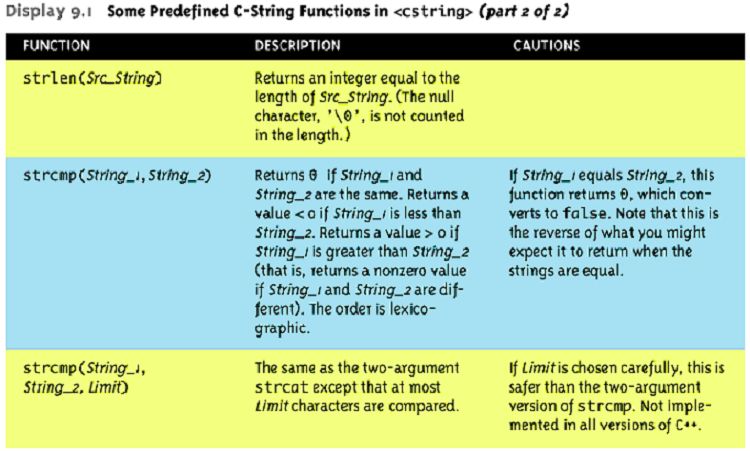
The <cstring> Library Cont’d
Full of string manipulation functions
Display 9.1, page 357
|
 Slide 15
C-string Functions: strlen()
‘String length’
Often useful to know string length:
char myString[10] = “dobedo”;
cout
<< strlen(myString);
Returns number of characters
Not including null
Result here:
6
|
 Slide 16
C-string Functions: strcat()
strcat()
‘String concatenate’:
char stringVar[20] = “The rain”;
strcat(stringVar, “in Spain”);
Note result:
stringVar
now contains “The rainin Spain”
Be careful!
Incorporate spaces as needed!
|
 Slide 17
C-string Arguments and Parameters
Recall: c-string is array
So c-string parameter is array parameter
C-strings passed to functions can be changed
by receiving function!
Like all arrays, typical to send size as well
Function ‘could’
also use ‘\0’
to find end
So size not necessary if function won’t change
c-string parameter
Use ‘const’
modifier to protect c-string
arguments
|
 Slide 18
C-String Output
Can output with insertion operator, <<
As we’ve been doing already:
cout
<< news << “
Wow.\n”;
Where
news
is a c-string variable
Possible because << operator is
overloaded for c-strings!
|
 Slide 19
C-String Input
Can input with extraction operator, >>
Issues exist, however
Whitespace is ‘delimiter’
Tab, space, line breaks are ‘skipped’
Input reading ‘stops’
at delimiter
Watch size of c-string
Must be large enough to hold entered string!
C++ gives no warnings of such issues!
|
 Slide 20
C-String Input Example
char a[80], b[80];
cout << “Enter input: “;
cin >> a >> b;
cout << a << b << “END OF OUTPUT\n”;
Dialogue offered:
Enter input: Do be do to you!
DobeEND OF OUTPUT
Note: Underlined portion typed at keyboard
C-string a
receives: “do”
C-string b
receives: “be”
|
 Slide 21
C-String Line Input
Can receive entire line into c-string
Use getline(), a predefined member
function:
char a[80];
cout
<< “Enter input: “;
cin.getline(a, 80);
cout << a << “END OF OUTPUT\n”;
Dialogue:
Enter input: Do be do to you!
Do be do to you!END OF INPUT
|
 Slide 22
More getline()
Can explicitly tell length to receive:
char shortString[5];
cout
<< “Enter input: “;
cin.getline(shortString, 5);
cout << shortString << “END OF OUTPUT\n”;
Results:
Enter input: dobedowap
dobeEND
OF OUTPUT
Forces FOUR characters only be read
Recall need for null character!
|
 Slide 23
Character I/O
Input and output data
ALL treated as character data
e.g.: number 10 outputted as ‘1’
and ‘0’
Conversion done automatically
Uses low-level utilities
Can use same low-level utilities ourselves
as well
|
 Slide 24
Member Function get()
Reads one char at a time
Member function of cin object:
char nextSymbol;
cin.get(nextSymbol);
Reads next char & puts in variable
nextSymbol
Argument must be char type
Not ‘string’!
|
 Slide 25
Member Function put()
Outputs one character at a time
Member function of cout object:
Examples:
cout.put(‘a’);
Outputs letter ‘a’
to screen
char myString[10] = “Hello”;
cout.put(myString[1]);
Outputs letter ‘e’
to screen
|
 Slide 26
More Member Functions
putback()
Once read, might need to ‘put back’
cin.putback(lastChar);
peek()
Returns next char, but leaves it there
peekChar = cin.peek();
ignore()
Skip input, up to designated character
cin.ignore(1000, ‘\n’);
Skips at most 1000 characters until ‘\n’
|
  Slide 27
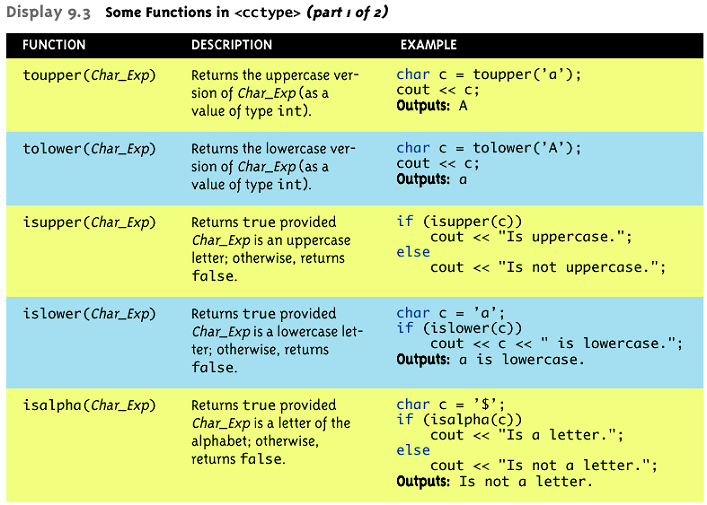
Character-Manipulating Functions
Display 9.3,
page 372-373
|
  Slide 28
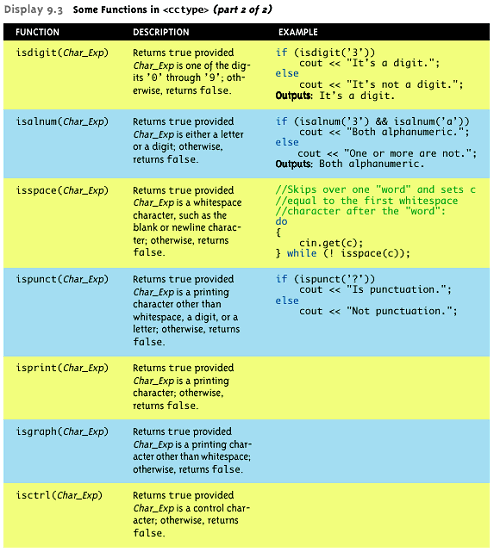
Character-Manipulating Functions
Cont’d
Display 9.3,
page 372-373
|
 Slide 29
Standard Class string
Defined in library:
#include <string>
using namespace std;
String variables and expressions
Treated much like simple types
Can assign, compare, add:
string s1, s2, s3;
s3 = s1 + s2;
//Concatenation
s3 = “Hello Mom!”
//Assignment
Note c-string “Hello Mom!”
automatically
converted to string type!
|
 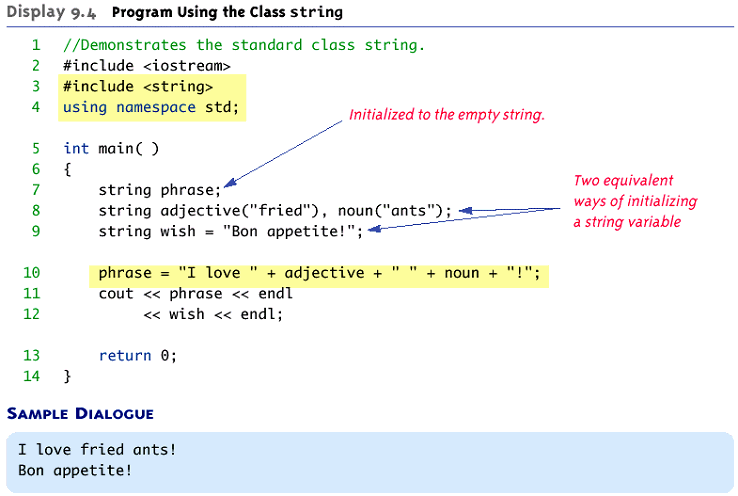 Slide 30
Program Using Class string
Display 9.4,
page 377
|
 Slide 31
I/O with Class string
Just like other types!
string s1, s2;
cin
>> s1;
cin >> s2;
Results:
User types in:
May the hair on your toes grow long and curly!
Extraction still ignores whitespace:
s1 receives value “May”
s2 receives value “the”
|
 Slide 32
getline() with Class string
For complete lines:
string line;
cout << “Enter a line of input: “;
getline(cin, line);
cout << line << “END OF OUTPUT”;
Dialogue produced:
Enter a line of input: Do be do to you!
Do be do to you!END OF INPUT
Similar to c-string’s usage of getline()
|
 Slide 33
Other getline() Versions
Can specify ‘delimiter’
character:
string line;
cout << “Enter input: “;
getline(cin, line, ‘?’);
Receives input until ‘?’
encountered
getline() actually returns reference
string s1, s2;
getline(cin, s1) >> s2;
Results in: (cin) >> s2;
|
 Slide 34
Pitfall: Mixing Input Methods
Be careful mixing cin >> var and getline
int
n;
string line;
cin >> n;
getline(cin, line);
If input is:
42
Hello hitchhiker.
Variable n set to 42
line set to empty string!
cin
>> n skipped leading whitespace, leaving
‘\n’
on stream for getline()!
|
 Slide 35
Class string Processing
Same operations available as c-strings
And more!
Over 100 members of standard string class
Some member functions:
.length()
Returns length of string variable
.at(i)
Returns reference to char at position i
|
 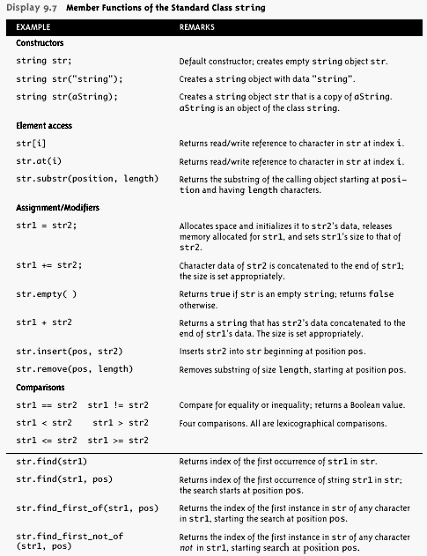 Slide 36
Class string Member Functions
Display 9.7,
page 386
|
 Slide 37
C-string and string Object
Conversions
Automatic type conversions
From c-string to string object:
char aCString[] = “My C-string”;
string stringVar;
stringVar = aCstring;
Perfectly legal and appropriate!
aCString = stringVar;
ILLEGAL!
Cannot auto-convert to c-string
Must use explicit conversion:
strcpy(aCString, stringVar.c_str());
|
 Slide 38
Summary
C-string variable is ‘array of characters’
With addition of null character, ‘\0’
C-strings act like arrays
Cannot assign, compare like simple variables
Libraries <cctype> & <string> have useful
manipulating functions
cin.get() reads next single character
getline() versions allow full line reading
Class string objects are better-behaved
than c-strings
|